Product Details
Every Feature Explained in Detail
Comprehensive documentation of all features, workflows, and configuration options in LeadRadar Pro — for sales teams and decision-makers.
The Pipeline — Step by Step
From SHAB entry to qualified lead: LeadRadar processes hundreds of commercial register entries daily in a fully automated 8-step pipeline.
The 8 Steps of the Pipeline
Daily retrieval of all new entries from the Swiss Official Gazette of Commerce (SHAB) for the configured cantons.
Comparison with all entries from the last 90 days. Previously processed companies are automatically excluded.
Filtering by configured event types (e.g., new incorporation, management change). Including keyword matching and exclude lists in DE/FR/IT.
Claude AI analyzes each entry: identifies the segment, evaluates relevance (0–100 score), and provides a reasoning.
Automatic enrichment via Google Places (phone, website, ratings) and AI-powered website analysis.
Word templates are populated per segment, event, and language and generated as PDF. Personalized salutation and company data.
Qualified leads are automatically assigned to the responsible sales representative — based on canton rules.
Email notification to configured users with a summary of new leads, scores, and follow-ups.
Deduplication (90-Day Window)
Each company is deduplicated over a 90-day window. If a company is published again in the SHAB within 90 days, it will not be captured as a lead again. This prevents duplicate contacts and ensures your sales team only receives truly new signals.
Event Filter with Keywords
For each event type, keywords can be defined that must be present (e.g., 'CEO', 'Board of Directors') as well as exclude keywords (e.g., 'in liquidation', 'bankruptcy'). The keywords are trilingual (DE/FR/IT) and are automatically applied to the SHAB text.
AI Scoring & Classification
Each commercial register entry is analyzed and evaluated by Claude AI. The system identifies segments, calculates a relevance score, and provides a traceable reasoning.
The Score (0–100)
The AI evaluates each entry with a score from 0 to 100. The score considers: segment match, event type, company description, legal form, and industry relevance.
≥ 85%
Qualified
70–84%
Review Candidate
< 70%
Excluded
AI Reasoning
For each qualified lead, the AI provides a reasoning: Why was this lead classified as relevant? Which keywords matched? Which segment was identified? This gives your sales team context for the initial outreach.
Configurable Thresholds
- Min score configurable per customer (default: 85%)
- Review score for manual review (default: 70%)
- Keywords and exclude keywords per event type
- Segment-specific keyword lists in DE/FR/IT
Lead Enrichment
Each qualified lead is automatically enriched with data from three sources — Google Places, website analysis, and SHAB data.
Google Places
- Phone number
- Website URL
- Google rating (0–5 stars)
- Number of reviews
Website Analysis (AI)
- Company description
- Products & services
- Team size & members
- Latest news & updates
SHAB Data
- UID & commercial register no.
- Company purpose
- Capital & legal form
- Full publication
Intelligent Name Matching
Google Places sometimes returns slightly different company names. LeadRadar uses the Jaro-Winkler algorithm with a threshold of 0.88+ for name matching — supplemented by token verification and location check. This ensures only correct matches are accepted.
Lead Management & CRM
Complete CRM system with lead pipeline, tasks, follow-up system, and automatic assignment — integrated directly into the platform.
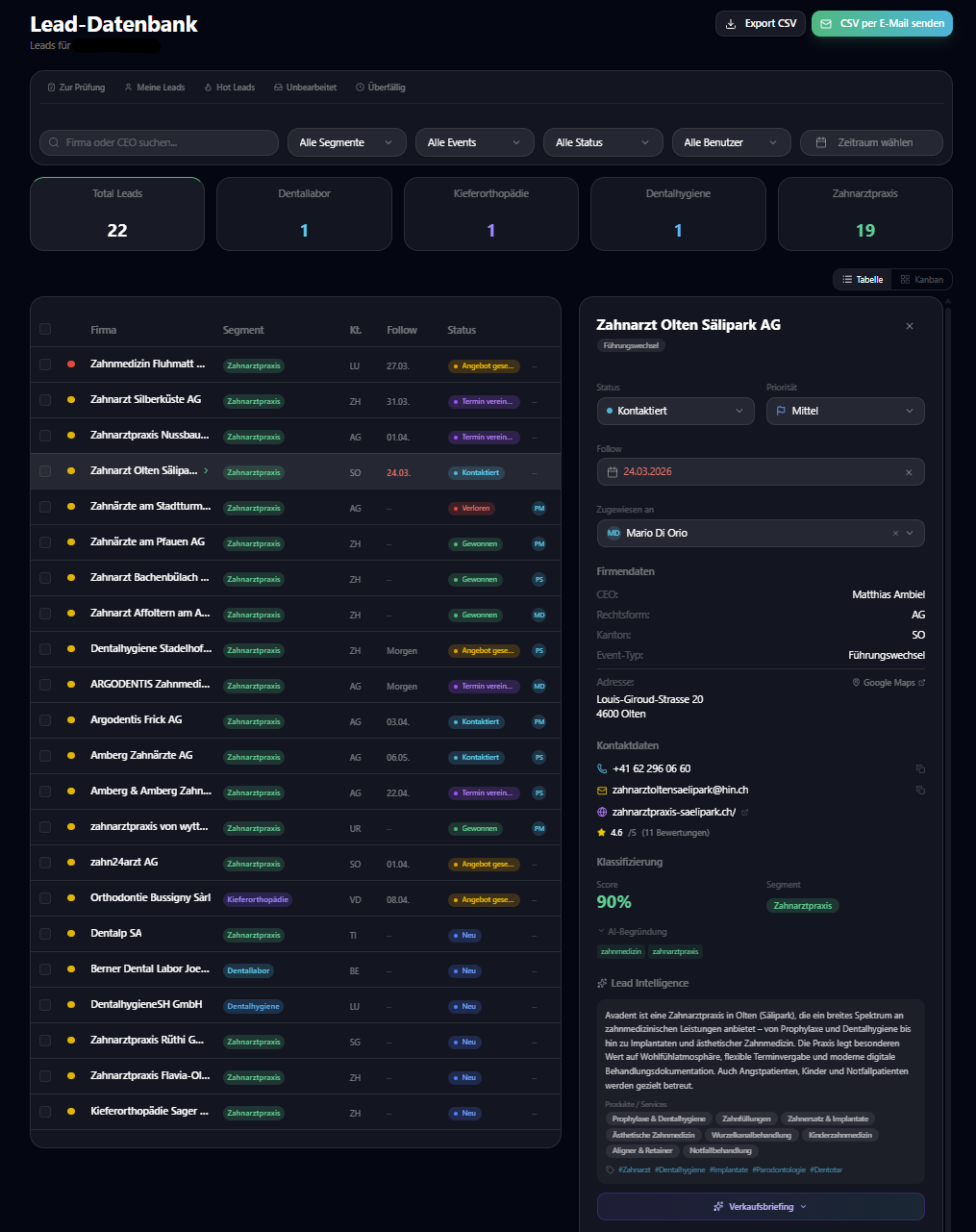
Lead Detail Panel
- Contact data: name, email, phone, role, address with Google Maps
- AI classification: segment, score, reasoning, keywords
- Company data: legal form, canton, purpose, capital, UID
- Lead intelligence: website analysis, products, team, news
- Sales briefing: AI-generated conversation guide
- Activity timeline: calls, emails, meetings, comments
Status Workflow (customizable)
Each customer can define their own lead status workflow. Default workflow with 6 stages — expandable as needed. Including deal value tracking and lost reason capture.
Auto-Assignment by Canton
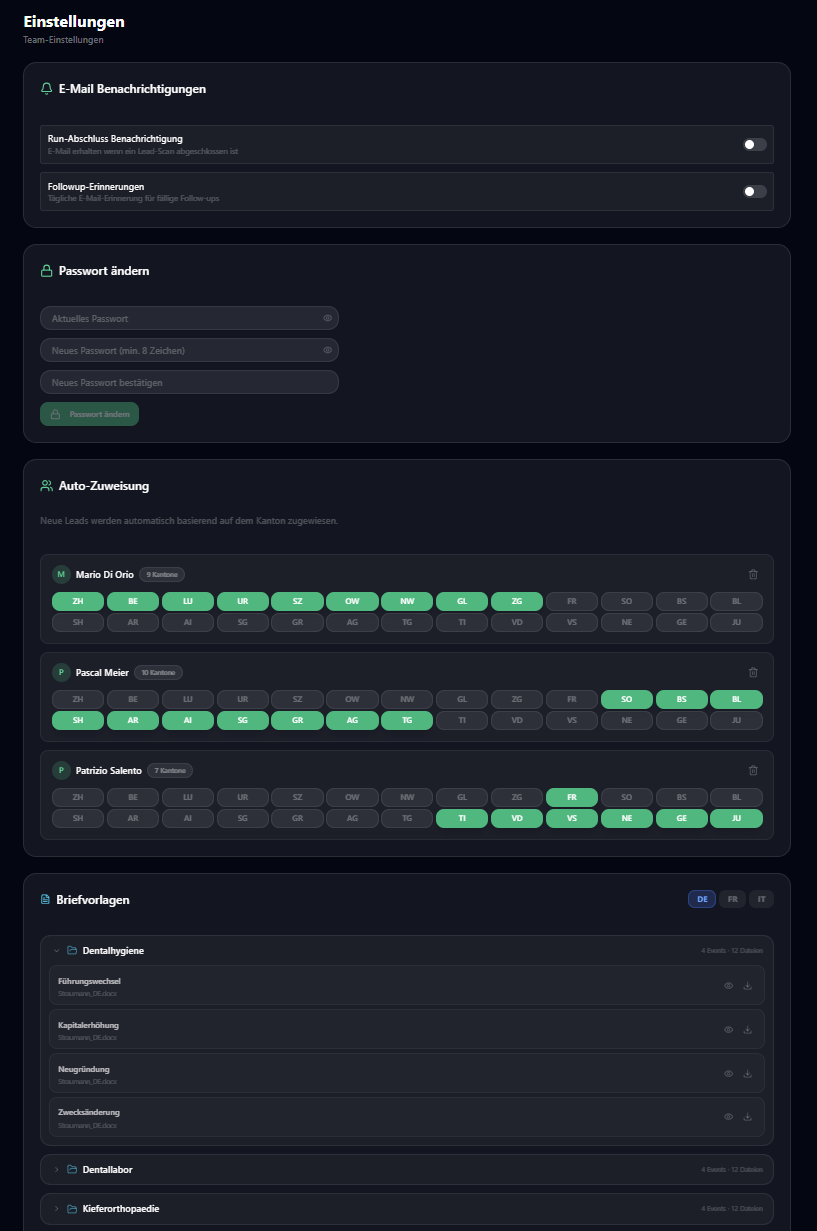
Leads are automatically assigned to the responsible sales representative — based on configurable canton rules. Example: All leads from ZH, AG, ZG go to employee A. All leads from VD, GE, NE to employee B.
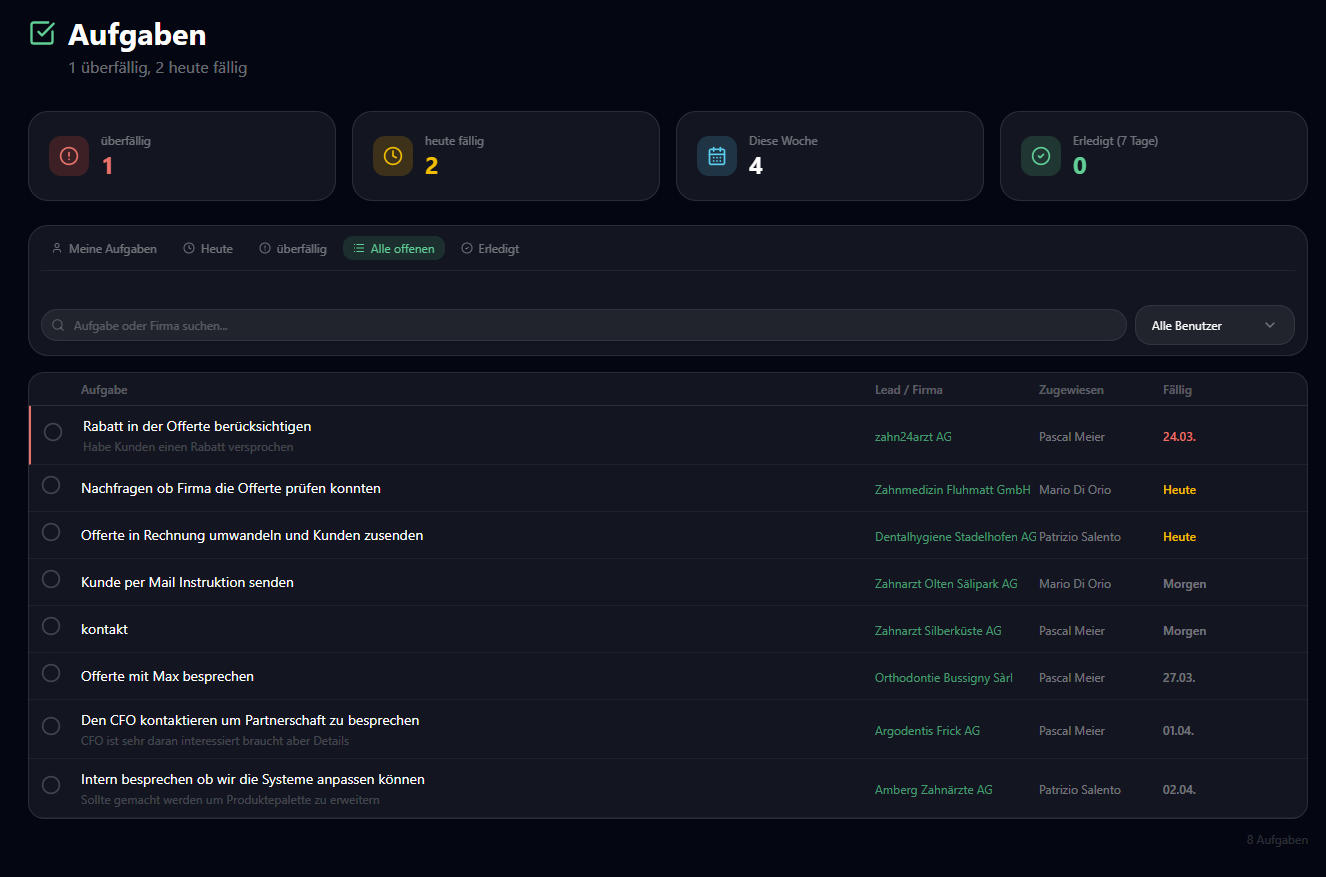
Tasks & Follow-up
Create tasks per lead with due date and priority. The follow-up system reminds you via email about overdue contacts. Quick selectors for 'Today', 'Tomorrow', or custom date.
AI Briefings & Email Drafts
Claude AI generates context-rich sales briefings and personalized email drafts — based on all available lead data.
What a Briefing Contains
- Why this lead is relevant (event context)
- Company information (industry, size, online presence)
- Contact details and contact person
- Concrete conversation guide (opening sentences)
- Possible objections and counter-strategies
Email Draft Generation
With one click, the AI generates a personalized email draft — based on company data, event type, contact person, and website analysis. The draft can be opened directly in the mail app and customized.
Multi-Language with Caching
Briefings are generated in the lead's language (DE/FR/IT) and automatically cached. Translations into other languages are created on demand and stored — no duplicate API call.
Letter Printing & Postal Dispatch
Complete letter printing system with template management, automatic PDF generation, and three operating modes — from self-service to fully managed.
Template System (Segment × Event × Language)
For each combination of segment, event type, and language, an individual Word template can be stored. For Straumann Switzerland, this means: 5 segments × 4 events × 3 languages = 60 individual letter templates.
├── zahnarztpraxis/
│ ├── neugruendung/ → de.docx, fr.docx, it.docx
│ ├── fuehrungswechsel/ → de.docx, fr.docx, it.docx
│ └── kapitalerhoehung/ → de.docx, fr.docx, it.docx
├── dentallabor/ → ...
└── fallback/ → de.docx, fr.docx, it.docx
Three Operating Modes
By Fluxaro
We print and send the letters for you. Including shipment tracking and receipt upload.
Self-Service
You print yourself. Admin users see a letter printing section with download and status tracking.
No Printing
Letter printing disabled. Leads are only processed digitally.
OneDrive Integration
Templates are managed directly in Microsoft OneDrive. Editing in Word Online, automatic synchronization. Secure OAuth2 authentication.
Analytics in Detail
Comprehensive real-time analytics with 8 different views — from pipeline conversion to ROI tracking.
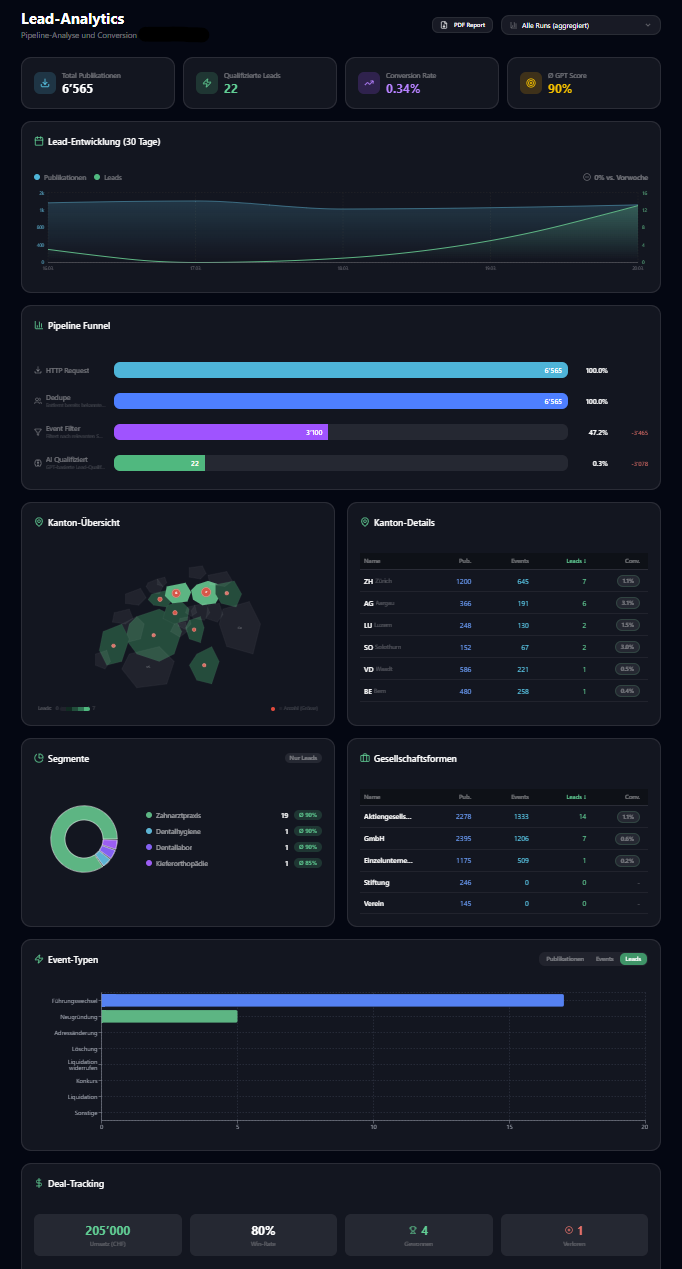
Funnel Analysis
Visualizes the entire pipeline: SHAB entries → event filter → deduplication → AI qualification → leads. Shows conversion rates and dropoff at each stage.
Timeline
Daily trends: number of publications, qualified leads, and conversion rate over time. Trend detection (rising/falling/neutral).
Segment Performance
Breakdown by AI segment: number of leads, average score, color-coded visualization.
Canton Heatmap
Geographic distribution of leads on a Swiss map. Per canton: total publications, qualified leads, conversion rate.
Event Distribution
Which event types generate the most leads? New incorporations vs. management changes vs. capital increases compared.
AI Quality Check
Identifies potential false negatives: entries that were rejected but match the target segment. Score distribution and threshold analysis.
ROI Dashboard
Deal tracking with won/lost status, revenue, win rate, and average deal value. Lost reason analysis for improvements.
Scoring Feedback
Win rate per score range (e.g., 85–90%, 90–95%, 95–100%). Helps calibrate the AI threshold.
Configuration & Personalization
Each customer receives an individually configured instance — from monitored cantons to the AI threshold.
26 Cantons
Any combination of the 26 Swiss cantons. Bilingual cantons (BE, FR, VS, GR) automatically generate leads in both languages.
Segments
Freely definable target group segments with keywords in DE/FR/IT. Example: 'Dental practice', 'Dental lab', 'Orthodontics'. Up to 8 segments per customer.
15 Event Types
From new incorporations to management changes to mergers — each event type can be individually activated. Per event: require keywords and exclude keywords.
14 Legal Forms
Standard: AG, GmbH, sole proprietorship. Extended: KlG, KmG, cooperative, association, foundation, and more. Recognized multilingually (GmbH = Sàrl = Sagl).
Schedule
Daily, weekly, or monthly — with freely selectable time and timezone (Europe/Zurich). Optional: override date for one-time special runs.
Min Score
Configurable minimum score for lead qualification. Default: 85%. Review candidates from 70% for manual review.
Branding
Logo and primary color per customer. Applied in emails, letters, and the user interface.
Auto-Assignment
Canton-based rules: define which employee handles which cantons. New leads are automatically assigned.
Security & Compliance
Enterprise-grade security with role-based access control, complete audit trail, and EU hosting in Germany — Swiss servers on request.
4 User Roles
Super Admin
Full platform access, manage all customers
Admin
Customer admin: users, configuration, letter printing
User
Edit leads, tasks, follow-ups
Viewer
Read only — no editing
Complete Audit Trail
Every action is logged: login, lead changes, status updates, configuration changes, downloads, API access. Filterable by user, action, time period, and customer. Including IP address and detail JSON.
Technical Security
- HSTS with preload (2 years, including subdomains)
- Content Security Policy (CSP) with strict rules
- Encrypted JWT authentication (8h sessions, ended after a password change)
- Brute-force protection (5 attempts / 15 min)
- EU hosting in Germany with SSL/TLS encryption, Swiss servers on request (Enterprise)
Notifications
Automatic email notifications keep your team up to date — without manual checking.
Run Completion Notification
After each completed run, configured users receive an email with: number of new leads, top scores, pipeline summary, and direct link to the platform.
Follow-up Reminders
Daily email to users with due follow-ups. Shows: overdue leads (red), due today (orange), and upcoming. With company name, status, score, and date. Sent at the customer's configured time.
Per-User Preferences
Each user can individually set which notifications they want to receive. Dedup logic prevents follow-up reminders and run notifications from being sent simultaneously.
Ready for a Demo?
Let us show you LeadRadar Pro live — we'll configure a demo with your target groups and cantons.